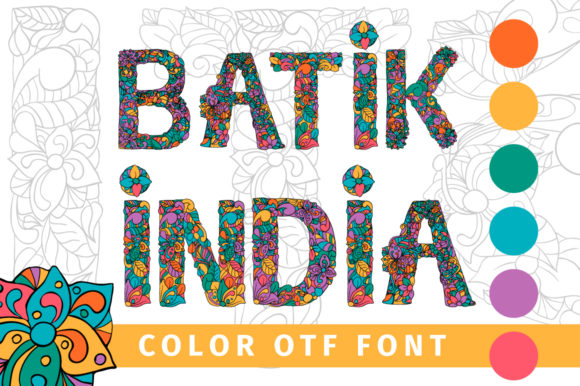
Batik India: A Vibrant Color Font for Creative Projects
If you’ve ever wanted a typeface that feels like a burst of joy—full of life, rhythm, and visual warmth—Batik India might be exactly what your designs have been missing. It’s not just another decorative font. It’s a colorful, expressive, OpenType-SVG typeface inspired by the rich textures and lively patterns of traditional batik art. Each letter is hand-crafted with layered hues, subtle gradients, and organic contours that evoke hand-dyed fabric, festival banners, and artisanal illustration.
What Makes Batik India Stand Out?
Unlike standard fonts that rely on outlines and solid fills, Batik India is built as a color font—meaning its letters contain embedded color data, not just shapes. This gives every character depth, dimension, and personality right out of the box. You don’t need to manually recolor or layer effects in design software. The charm is baked in.
It’s designed for creators who value both aesthetics and efficiency—those who want eye-catching typography without spending hours tweaking swatches or building multi-layer glyphs. Whether you're designing a boutique logo, a social media post for a yoga studio, or a playful book cover for a children’s story, Batik India adds instant character and cultural resonance.
Where Does Batik India Shine?
This font thrives in contexts where authenticity, warmth, and visual storytelling matter. Think greeting cards for Diwali or Holi, packaging for small-batch spice brands, Instagram graphics for indie makers, classroom posters for multicultural education units, or even animated explainer videos where text needs to feel alive.
A wedding planner might use Batik India for save-the-date illustrations that reflect South Asian heritage. A teacher could print themed vocabulary flashcards with it to spark curiosity in young learners. A food blogger might overlay it on vibrant flat-lay photos of biryani or mango lassi—its playful energy complements rich visuals without competing.
Because it’s an OpenType-SVG font, it works seamlessly in Adobe Photoshop and Illustrator (with color font support enabled), Silhouette Studio (v5.0+), and Inkscape (v1.1+). That means you can scale it freely, apply non-destructive effects, and export crisp vector or raster output—ideal for both digital screens and print-ready assets.
What You Should Know Before Using It
First, keep compatibility in mind. While Batik India delivers stunning results in supported apps, its OTF and TTF files are *not* compatible with Cricut Design Space. If you’re planning to cut vinyl or create iron-on transfers via Cricut machines, this font won’t work natively. You’ll need to convert letters to outlines first—or choose a different typeface optimized for cutting software.
Second, remember that color fonts behave differently than traditional fonts. They require software that understands SVG layers and embedded palettes. Older versions of some programs may display fallback black-and-white glyphs instead of the full-color effect. Always double-check your app version and enable color font support in preferences if needed.
Third, while Batik India is joyful and expressive, it’s best used at medium to large sizes—think headlines, quotes, titles, and short phrases. Its intricate coloring and texture soften at very small point sizes, so avoid using it for body text or fine captions.
Simple Ways to Get Started
You don’t need advanced skills to make the most of Batik India. Here are a few beginner-friendly ideas:
- Create a bold Instagram Story header: Type “Namaste” or “Spice & Soul” in Batik India, drop it over a warm-toned background, and add a subtle shadow or glow for extra pop.
- Design a printable wall quote: Pair it with a simple sans-serif for contrast—e.g., “Breathe in kindness. Breathe out light.”—and print on textured paper for handmade appeal.
- Make custom stickers: Use Silhouette Studio to resize and arrange letters into fun word-art shapes, then cut them from glossy vinyl for craft fairs or shop branding.
- Enhance educational slides: Add a splash of Batik India to section headers in a presentation about world textiles or global art traditions—it invites attention without overwhelming content.
Why It Fits Real Creative Needs
Many designers juggle tight deadlines, limited tools, and growing expectations for originality. Batik India helps bridge that gap—not by replacing skill, but by offering a ready-made element of distinction. It saves time on color exploration, supports inclusive visual language, and brings gentle cultural nuance to projects without appropriation, because its inspiration is rooted in celebration—not stereotype.
For entrepreneurs launching lifestyle brands, educators building inclusive curricula, or freelancers pitching unique visual identities, this font offers more than decoration. It’s a thoughtful tool—one that signals care in craft, respect for tradition, and confidence in creative voice.
A Note on Learning and Support
If you're new to color fonts, don’t worry—getting started is easier than it sounds. Most modern design apps include intuitive controls for toggling color layers, adjusting transparency, or exporting with embedded palettes. For step-by-step guidance, our Ultimate Font Guide walks through installation, troubleshooting, and best practices across platforms. It covers everything from enabling SVG support in Photoshop to optimizing exports for web use.
And while Batik India stands out for its vibrancy, it also pairs beautifully with clean, minimalist typefaces—creating balanced compositions where personality meets clarity. Try setting a headline in Batik India and supporting text in a neutral sans serif. The contrast feels intentional, human, and quietly sophisticated.
In short, Batik India isn’t about chasing trends. It’s about finding a font that feels like a quiet collaborator—supporting your message, honoring craft, and adding just the right amount of joyful color to your next project.